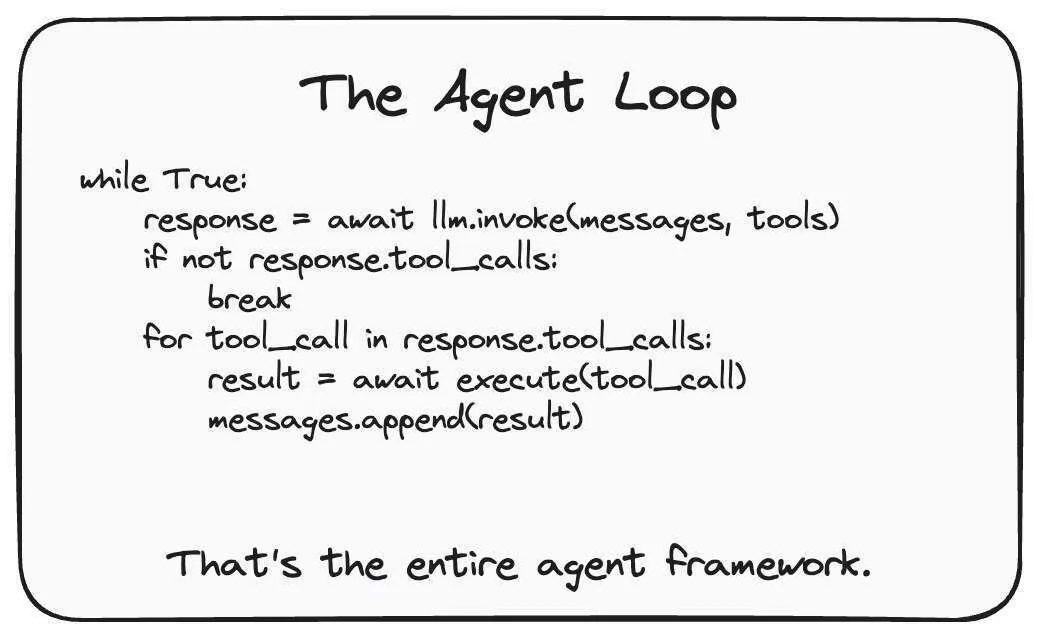
The image above shows seven lines of pseudo-code, with the caption that this is the entire agent framework. And it’s right! That loop really is all the control flow an agent has.
The loop calls the model, runs whatever tools the model asked for, adds the results to the conversation, and goes round again. It stops when the model stops asking for tools.
Nothing in the loop says “read the failing test, then open the module, then patch it, then rerun”. The model makes that plan itself, one tool call at a time. Your code only keeps the loop turning, which is why a framework can’t add much to the control flow.
So the engineering happens in the code around the loop. I call that code the harness. My working definition is simple: an agent is a model plus a harness, and anything that isn’t the model is harness.
This post goes through what goes into a harness, and what breaks when a piece is missing. It’s long, because some of it only makes sense with code and a little maths.
A quick word on tools first. A tool is a function the model can ask you to run. The model writes the tool’s name and arguments as JSON, your code runs it, and you send the result back.
I’ll use one example the whole way through. A coding agent is asked to fix a failing test. It has four tools (read_file, grep, apply_patch and run_tests) and a copy of the repository to work in.
The loop as real code
Here’s the loop from the image as real code you can run against the OpenAI Responses API. It has one toy tool that multiplies two numbers.
import json, os
from openai import OpenAI

TOOLS = [{
    "type": "function", "name": "multiply",
    "description": "Multiply two integers exactly. Use this instead of doing arithmetic yourself.",
    "parameters": {"type": "object",
                   "properties": {"a": {"type": "integer"}, "b": {"type": "integer"}},
                   "required": ["a", "b"], "additionalProperties": False},
    "strict": True,
}]
REGISTRY = {"multiply": lambda a, b: {"product": a * b}}

def execute(name: str, arguments: str) -> str:
    try:
        return json.dumps(REGISTRY[name](**json.loads(arguments)))
    except Exception as exc:  # errors are data: the model reads them and can retry
        return json.dumps({"ok": False, "error": f"{type(exc).__name__}: {exc}"})

def run(task: str, client: OpenAI, max_turns: int = 10) -> str:
    items = [{"role": "user", "content": task}]
    for _ in range(max_turns):                       # a brake instead of `while True`
        response = client.responses.create(
            model=os.environ["MODEL"], input=items, tools=TOOLS,
            instructions="You are a careful assistant. Use tools for arithmetic.",
            store=False, include=["reasoning.encrypted_content"],
        )
        if response.status == "incomplete":
            raise RuntimeError(f"incomplete: {response.incomplete_details}")
        # The model's own items first: reasoning, function calls, messages.
        items += [i.model_dump(by_alias=True, exclude_unset=True) for i in response.output]
        calls = [i for i in response.output if i.type == "function_call"]
        if not calls:
            return response.output_text
        for call in calls:                           # one result per call, paired by id
            items.append({"type": "function_call_output", "call_id": call.call_id,
                          "output": execute(call.name, call.arguments)})
    raise RuntimeError(f"no final answer after {max_turns} turns")
It’s short, but it already fixes four bugs in the image’s version.
First, it sends back the model’s own tool-call item along with the result. The loop in the image only appends the result.
Without the call item, the next request holds an answer to a question the transcript no longer asks. OpenAI’s own migration guide lists this among the common errors.
Second, it sends the model’s hidden reasoning back exactly as it came. A reasoning model thinks in steps you can’t read, and the API hands them to you in encrypted form. Drop them and the model loses its train of thought between turns, or the API rejects the request outright.
Third, it handles execute() raising an error. In the image’s loop, one bad argument kills the whole run. Here the error becomes a small JSON message that the model can read and fix on its next turn.
Fourth, it has a brake. while True never gives up, and a confused model will happily loop until someone reads the invoice. This version stops after max_turns.
That’s enough to run an agent. I wouldn’t leave it running alone overnight, though.
What a harness adds
Here’s what happens between two model calls once a proper harness is in place. The model’s part is one line.
assemble context   instructions + tool definitions + transcript, stable order; compact if too big
call the model     with a timeout; back off on 429 / 5xx / network errors; never retry quota errors
parse              text, reasoning, tool calls; read the stop reason (done? truncated? refused?)
record             trace the request and response; checkpoint the transcript
for each call:
  policy           allow / ask a human / deny  (a denial goes back to the model as a result)
  execute          in a sandbox, with a timeout and resource limits
  truncate         head + tail of long output; full copy on disk, path in the result
  append           result tagged with its call id; checkpoint again
check budgets      turns, tokens, dollars, wall-clock; then stop or go round again
Every line in that block is there because something broke without it. Here’s the short version as a table. After that I’ll go through the pieces one at a time.
| Harness piece | What goes wrong without it |
|---|---|
| Tool errors returned as results | One bad argument crashes the whole run |
| Output limit that keeps head and tail | The traceback at the end of the output gets cut off |
| Separate stop statuses | Hitting the turn cap gets counted as a success |
| Token and dollar budgets | Cost grows with the square of the number of turns |
| One retry layer | Retries add up and never show up in your trace |
| Stable start of the prompt | You lose the prompt cache discount |
| Sandbox first, approvals second | People approve prompts without reading them |
| Checkpoint after every tool result | A side effect runs twice after a crash |
The tool layer
The model never touches anything directly. Every read and every write goes through a tool you chose to offer and chose to run.
The tool definitions (names, descriptions and argument schemas) are sent with every request. So they are part of the prompt, and the way you design them changes how well the model works.
The best evidence for this is old, but it has held up. It comes from the SWE-agent ablations on SWE-bench Lite with GPT-4 Turbo. An ablation is a test where you take away one piece at a time and see how much the score drops.
| Tool setup | Issues solved |
|---|---|
| Full interface | 18.0% |
| No edit tool | 10.3% |
| Whole file shown, in place of a viewer with a bounded window | 12.7% |
| Iterative search tool | 12.0% |
| No search tool at all | 15.7% |
The full interface solved about 1.75 times as many issues as the version with no edit tool (18.0% vs 10.3%).
And the iterative search tool, at 12.0%, did WORSE than having no search tool at all, at 15.7%!
From results like that, here’s what I treat as the minimum for a tool layer.
Validate before you run anything. Check that the tool exists, that the arguments parse as JSON, and that they match the schema, in that order. Then turn every failure into a result the model can read, like this one.
invalid arguments: 'mode' must be one of ['unit', 'integration'], got 'all'The model fixes that on its next turn. A stack trace in your terminal helps nobody.
Next, keep the model’s mistakes apart from bugs in your tool. A missing file is something the model can act on, so tell it what to do next. Any other exception is a bug in the tool.
Log that bug with its traceback. But still return it to the model as data, labelled as an internal error, so one broken tool doesn’t end a long run.
Then bound every output, and keep the end of it. When the agent runs the test suite, it might get 3,000 lines back. If you simply cut the end off, you lose the tracebacks and summaries, because that’s where they live.
So keep the head and the tail. Save the full text to a file and put the path in the result. Then the model can page through it if it needs to.
Here’s the code. My harness cuts any result over 16,000 characters this way by default.
def truncate_text(text: str, max_chars: int, full_output_path: str | None = None) -> str:
    """Keep the first 3/4 and the last 1/4 of max_chars, with a note in between."""
    if len(text) <= max_chars:
        return text
    head = max_chars * 3 // 4
    tail = max_chars - head
    where = f" Full output: {full_output_path}" if full_output_path else ""
    note = f"\n\n[... {len(text) - head - tail:,} of {len(text):,} characters omitted.{where} ...]\n\n"
    return text[:head] + note + text[len(text) - tail:]
Last, run tools in parallel only when they are read-only. Models often ask for several tools in one turn. Three grep calls can run at once, but two apply_patch calls to the same file cannot.
So mark tools as read-only explicitly. Run everything else one at a time, in order.
Stopping, budgets and retries
Run statuses
The loop in the image has one way to stop: the model stops asking for tools. A harness needs several, because the model may never stop, it may stop for the wrong reason, or you may need to stop it yourself.
I record each way of stopping as its own run status.
| Status | When it happens |
|---|---|
completed | The model gave a final answer |
max_turns | The turn cap ran out first |
budget_exceeded | A token, dollar or time budget ran out |
failed | The run hit an error it couldn’t recover from |
interrupted | Someone or something stopped the run from outside |
max_turns and completed both end the loop, but only one of them means the test is fixed. If your eval or your downstream code can’t tell them apart, sooner or later you’ll ship a turn cap as a success.
I follow three rules for stopping a run.
Treat truncation as failure. A response that hit the output-token limit may carry a half-written tool call. Running a half-written apply_patch is worse than stopping.
Check budgets before each model call, so the run stops before it spends too much.
Token and dollar budgets
A turn cap doesn’t limit cost, and the maths shows why.
The model is stateless. It remembers nothing between calls, so every turn resends the whole transcript so far. You pay for every token you send, and a token is a small chunk of text, often a short word.
Say the fixed part of each request (instructions, tools and the task) is tokens. Each turn adds more tokens, for one tool call plus its result.
On turn , counting from 1, you send tokens. Add that up over turns and the total input is this.
The first term grows in a straight line with the number of turns. The second term grows with the square of it.
Now put in some numbers. With , and 30 turns, the final transcript is 95,000 tokens.
| Turn | Tokens sent that turn |
|---|---|
| 1 | 8,000 |
| 2 | 11,000 |
| 10 | 35,000 |
| 30 | 95,000 |
| Whole run | 1,545,000 |
But the run sends about 1.5 MILLION tokens in total. That’s roughly 16 times as much as the final transcript (1,545,000 / 95,000).
So cap tokens, dollars and wall-clock time as well as turns. Server-side conversation state, where the provider keeps the transcript for you, doesn’t help here either. It saves bandwidth, and you still pay for the tokens.
Retries
Model calls fail: rate limits, overloaded servers, dropped connections.
Some of those clear up if you wait, and some never will. The harness has to know which is which.
Retry 408, 409, 429, 5xx, timeouts and connection errors. Use capped exponential backoff with full jitter.
Backoff means you wait longer after each failure, up to a cap. Full jitter means you sleep a random time between zero and that cap. That way a fleet of clients doesn’t retry in lockstep. My defaults are 5 attempts, a 1-second base and a 30-second cap.
Honour the retry-after header when the server sends one. It tells you how long to wait.
Don’t retry 400s, auth errors, or anything that means you’re out of quota or hit a spend cap. Waiting won’t add credit. OpenAI also counts failed requests toward rate limits, so blind retries make 429s worse.
The less obvious rule is to have one retry layer. The OpenAI and Anthropic SDK clients both retry twice by default.
An agent SDK runner might retry too, and then your harness retries on top.
Stack all three and the attempts add up. Each one can wait out the full request timeout, and none of the inner ones show up in your trace.
Even a single layer can stall for a long time. With 5 attempts and a 600-second timeout on each, one turn can take roughly 50 minutes before it gives up.
I set the vendor clients to max_retries=0 and make one module the only place that retries. Then every attempt is visible and counted.
Tool calls are never retried by the harness. A tool failure goes back to the model as data, and the model decides what to do.
Context and caching
The context is everything you send the model on each call. Both major providers cache by prefix.
If the start of your request matches a recent request byte for byte, those tokens are billed at about a tenth of the normal input price. The first changed byte ends the match.
In the 30-turn example above, at one model’s list prices in September 2026, the 1,545,000 input tokens cost about $3.09 with no caching. With a warm cache the same run costs about $0.53, roughly 6 times cheaper ($3.09 / $0.53).
So the layout of your context becomes a caching problem. Tool definitions and system instructions go first, and they never change during a run. No timestamps, no “today is…”, and no reordering the tools.
The transcript is append-only. If the sandbox mode or the working directory changes, add a new message saying so. Leave the first message alone.
Sooner or later you have to compact anyway. Compacting means shrinking the transcript once it gets too big. There are two common ways to do it.
You can summarise the run into a handoff note and restart from that note. Or you can replace old, large tool results with a one-line stub that says how to get the content back, like “run it again if needed”.
Both ways rewrite the prefix, so the next turn pays to cache it all again. A harness that compacts often can cost more than one that never caches at all.
So compact in one step, at a high threshold. My harness uses 150,000 tokens by default. Reach for the cheaper levers first. Those are bounded tool output, paging in read_file, and subagents that hand back a short answer in place of their whole working context.
The best public example of the context layer mattering comes from ARC-AGI-3. OpenAI reported that the same model scored 13.3% with the benchmark’s official harness and 38.3% with OpenAI’s own. That’s nearly 3 times the score (38.3 / 13.3 ≈ 2.9), using about six times fewer output tokens.
The official harness threw away the model’s reasoning items after every action and truncated the history past 175,000 characters. OpenAI’s harness kept the reasoning and compacted instead.
Safety and crash recovery
Sandbox and approvals
A rule in the prompt is only a suggestion.
“Don’t push to main” in the system instructions is something the model will usually follow, and usually isn’t good enough. Safety needs two separate controls.
| Control | Question it answers | Coding-agent example |
|---|---|---|
| Sandbox | What can a command touch, whatever it tries? | Writes limited to the checkout, no network, no secrets in the environment |
| Approval policy | When must someone say yes first? | Ask before git push or anything that leaves the sandbox |
The order matters: sandbox first, approvals second. Human approval wears out with use.
Anthropic’s data has people approving 93 to 97% of permission prompts. When everything asks, people stop reading. In a study of 1,053 testers, people caught a planted dangerous command only 13.6% of the time.
So let the sandbox make most actions safe to run without asking. Sandboxing cut Claude Code’s permission prompts by 84% inside Anthropic. Keep approvals for the few actions that can’t be undone or that reach outside the sandbox.
Two properties of the policy layer I treat as non-negotiable. The first is to fail closed.
If a tool needs approval and no approver is set up, the call is denied. A tool nobody listed is denied too.
The second is that a denial is data. The model gets not executed: <reason> as a tool result and can try another way. The run keeps going.
There’s one more rule, about the workspace. Resolve paths first, then check them.
The string "/workspace/../etc/passwd" starts with /workspace, but it points somewhere else once you follow the ... Checking the string before following .. and symlinks is how path-traversal bugs happen.
Keep the harness’s own logs and checkpoints out of the model’s reach too. An agent that can rewrite its checkpoint can plant a transcript that a resume will trust.
Checkpoints
An agent that runs for an hour will meet a closed laptop lid, a deploy, an OOM kill (the system killing a process that used too much memory) or a Ctrl-C.
A checkpoint is a saved copy of the transcript that you can resume from. Where you save it decides how much a crash costs.
Saving at turn boundaries leaves a gap. Say the process dies halfway through a batch of tool calls. The checkpoint holds nothing from that turn.
On resume, the model is asked again. It usually asks for the same tools, and a side effect that already happened runs TWICE. This failure shows up with agent SDKs that only checkpoint between turns.
So save after the model’s reply and after every single tool result. Save atomically: write a temp file, fsync it (force it onto the disk), then rename it over the old one. That way a crash can’t leave you with a half-written checkpoint.
On resume, run only the calls that have no result yet. That takes one small function.
def pending_tool_calls(transcript: list[Item]) -> list[ToolCall]:
    """Tool calls in the LAST assistant message that have no result yet."""
    for index in range(len(transcript) - 1, -1, -1):
        item = transcript[index]
        if isinstance(item, AssistantMessage):
            answered = {r.call_id for r in transcript[index + 1:] if isinstance(r, ToolResult)}
            return [call for call in item.tool_calls if call.id not in answered]
    return []
This narrows the risk down to the one call that was running when the process died. For reads, running that call again is harmless. For anything with a side effect, like sending a message, charging a card or appending to a file, it’s a duplicate.
So side-effecting tools need idempotency keys. An idempotency key is an ID for one specific action, so that doing the action a second time has no extra effect.
Derive the key from what the call means. Record the keys of completed calls somewhere durable. And pass the key on to any external service that accepts one.
Logs and tests
When a run goes wrong, you want to know what the model saw on turn 23, what it returned, what the tool did and what it cost. Only the harness sees every call, so only the harness can record it.
An append-only JSONL event log is enough to start. JSONL means one JSON object per line. Flush the file after every line.
A crash then loses at most one line, and jq works on the file. Nothing is ever rewritten, so the log doubles as an audit trail. Remember that traces contain prompts and tool outputs, and decide what you log on purpose.
Testing follows from one observation. The harness is ordinary code, and the model is the only part that’s slow, random and costs money. So test everything except the model offline.
A scripted fake model returns fixed turns, and it can raise an error on cue. With it you can test round trips, stop conditions, compaction, approvals and crash-resume for free.
Test the wire format separately. Run the real SDK against a mock HTTP transport, and check that provider items are replayed byte for byte. Leave the model itself to evals with repeated trials.
How much the harness matters
None of this means the harness matters more than the model. The Terminal-Bench 2.0 authors looked at their own results and wrote that “model selection is usually more important than agent scaffold”.
mini-swe-agent is about 100 lines, with bash as its only tool. It reports more than 74% on SWE-bench Verified, though that number is self-reported. A tiny harness is enough for a strong model.
But the same benchmark shows the harness moving a single model’s score by up to about 17 points. GPT-5 ranged from 33.9% to 49.6% depending on the harness.
LangChain reports taking its CLI agent from 52.8% to 66.5% on that benchmark, with the model held fixed. Part of the gain came from forcing a verification pass before the agent was allowed to finish.
| What changed | Before | After | Gain |
|---|---|---|---|
| Model, same harness (Codex CLI, GPT-5-Nano vs GPT-5.2) | 11.5% | 62.9% | about 51 points |
| Harness, same model (GPT-5, worst vs best) | 33.9% | 49.6% | 15.7 points |
| Harness, same model (LangChain CLI agent) | 52.8% | 66.5% | 13.7 points |
| Harness, same model (ARC-AGI-3) | 13.3% | 38.3% | 25 points |
The way I see it, the model sets the ceiling and the harness decides how close you get. The harness also decides whether you can ship at all. No benchmark measures whether your agent leaked a secret, double-charged a customer or lost an hour of work to a deploy.
What I’d do differently
If I built one again, I’d do a few things differently.
I’d start minimal and add one piece for each failure I actually saw. A harness designed up front bakes in guesses about what the model can’t do, and those guesses go stale with every model release. So I’d begin with a bash-only loop plus traces, then add one piece at a time.
I’d build every piece so it’s easy to delete. Some pieces exist only to cover a specific model’s weak spots. They should be easy to rip out when the next model doesn’t need them.
I’d write the stop statuses and the checkpoint before the clever bits. Context tricks are fun. Crash-safety is what lets you run anything long enough to find out whether the tricks work.
And I’d pick limits on purpose. Library defaults are tuned for chat, and one popular agent SDK stops at 10 turns. Long tasks often need several times that, so check every default cap before you trust a long run to it.